



AMD or Intel for your mini PC? Seven Scenarios, One Honest Verdict for Each
Takeaway
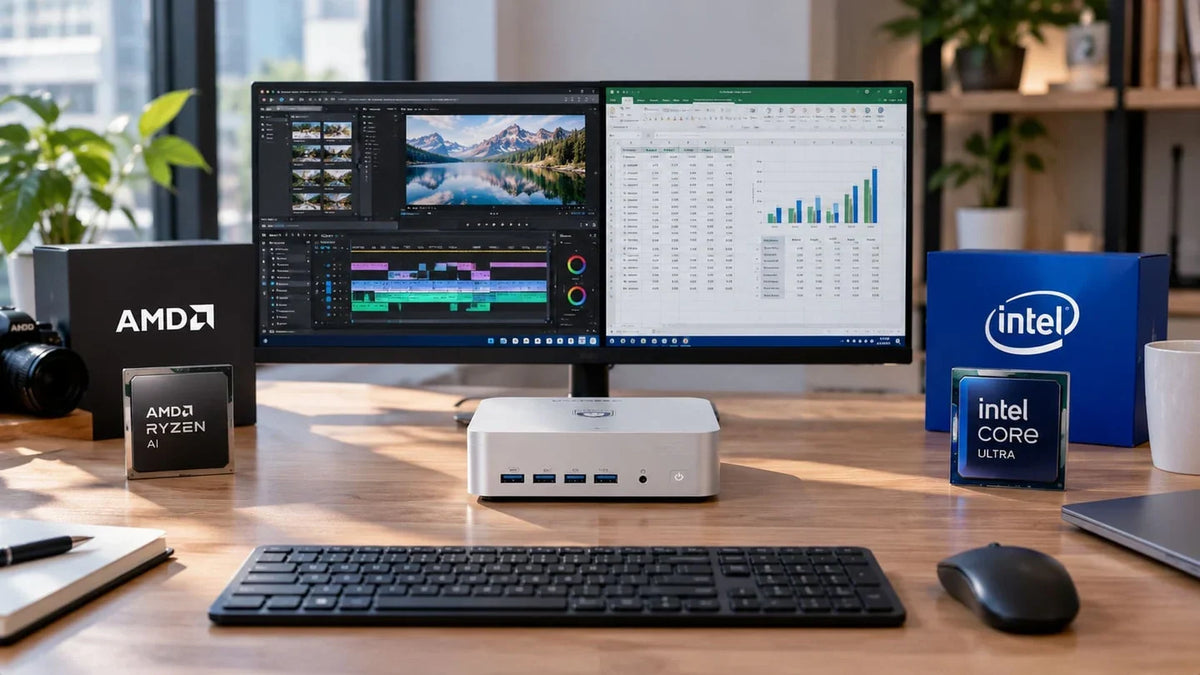
There's no outright winner – it all depends on what your typical working day looks like, whether you're in the office or working from home.
AMD performs better at:
• Juggling lots of windows at once
• Running AI workloads locally
• Keeping CPU temperatures lower at a sustained 65 W
Intel stands out for:
• Graphics-heavy tasks
• Casual gaming
• Faster connectivity via Thunderbolt 4 ports
How to read an AMD or Intel processor name
The processor is the nerve centre of any computer, so its capabilities affect everything else. How can you tell whether a processor really is the most powerful? And what do the manufacturers' codes actually mean?
Processor names can be confusing. At first glance you might think you're picking the most powerful option, or the one with the best balance between power draw and performance, but that isn't necessarily the case. With Intel, for instance, an i9 isn't automatically more powerful than an i7.
So how do you decode them? Each manufacturer has its own naming conventions. Let's look at a couple of examples.
Intel Core Ultra X9 388H – Core Ultra is the family, “X9” indicates the tier (they're split into 3/5/7/9 – the higher the number, the higher the tier), “388” is the model number and “H” signifies a high-performance processor.
AMD Ryzen AI 9 HX 470 – Ryzen is the family, “AI” shows that the chip is designed for artificial intelligence workloads, “9” indicates the tier (as with Intel, they're split into 3/5/7/9, with 9 being the most powerful), “HX” denotes maximum mobile performance and “470” is the specific model.
|
Brand |
Family |
Example |
Typical use |
|
Intel |
Core |
Core N150 |
Media server |
|
AMD |
Ryzen |
Ryzen 5 7430U |
Everyday office work |
|
Intel |
Core Ultra |
Core Ultra X9 388H |
AI development / advanced productivity |
|
AMD |
Ryzen |
Ryzen AI 9 HX 470 |
Design workstation / AI development |
Seven real-world situations where AMD and Intel behave differently
Monday, 9 am: thirty tabs, Teams and Excel all at once
You wake up, switch on your computer and once again you're faced with countless browser tabs, Teams windows for catching up with colleagues on the day's priorities, and a dozen Excel spreadsheets waiting to be worked on. All at once, with no chance to free up any memory.
This is where per-core speed and efficiency really count, along with how well the processor handles individual tasks.

Although Intel has historically led on single-thread performance in consumer processors, the latest generations of high-end mini PC chips lag slightly behind their AMD rivals.
Advantage: AMD
Exporting a ten-minute 4K video before a deadline
The project lead rings to ask for a few last-minute additions to the video. Now you have to re-export the whole project in 4K, and the clock is ticking. Sound familiar?
If you work with high-definition video, strong single-thread performance isn't what you need – here, multi-threaded performance is king, alongside hardware video encoders.
These days, every laptop-class and mini PC processor benefits from dedicated video encoding and decoding hardware (ASICs).
AMD has its Video Core Next (VCN) technology, while Intel uses Intel Quick Sync. In both cases, the latest processor generations support AV1 – across most of Intel's line-up, but only on AMD's higher-end chips, such as the Ryzen AI range.
AV1 support is found only in AMD VCN 4.0 and above, and in Intel Arc and Core Ultra.
Advantage: Draw
Developing 500 RAW photos in Lightroom
You've batch-edited hundreds of photos from an event in Lightroom, and now it's time to export them. Will the processor cope, or will it freeze and put your work at risk? To deal with situations like this, always check the GPU acceleration capabilities, which let the system use graphics power to speed up image processing.
Processors with integrated graphics often struggle with these tasks because they lack a dedicated GPU. That said, the latest generations offer more than respectable options.
In its higher-end chips, AMD relies on the Radeon 890M for graphics – an integrated GPU based on the RDNA 3.5 architecture that's widely praised for its performance and low power consumption. Intel, meanwhile, uses its integrated Arc graphics, with the Arc B390 setting the benchmark for this generation.
Both technologies meet Adobe Lightroom's system requirements, as they can use 8 GB of memory for graphics acceleration. However, they rely on the system RAM since they have no dedicated memory of their own.

Advantage: Intel
Running AI locally and using Copilot+ features
Local AI is becoming increasingly important. To make use of it, you need to check the NPU's TOPS rating. TOPS stands for Tera Operations Per Second – in other words, trillions of operations per second – and NPU is short for Neural Processing Unit, a chip dedicated to artificial intelligence tasks.
To run local AI features such as those in Copilot+, you need more than 40 TOPS. Not every processor can handle that level of throughput.
On the AMD side, only the AI 300/400 and Max processor families reach 40+ TOPS, with the AMD Ryzen AI 5 330 as the entry point.
For Intel, the Core Ultra Series 3 mobile processors meet this minimum, so options such as the Intel Core Ultra 185H aren't suitable for running Copilot+ features smoothly.
The processor alone isn't enough to run AI locally, though – graphics performance and RAM are part of the requirements too.
Advantage: AMD
A quick game after work
For many of us, gaming after a long day is how we unwind, and a good game can be genuinely relaxing. But with NPUs or CPUs that rely on integrated graphics, it's worth knowing that there are limits.
Integrated graphics have come on enormously, but they're still not as powerful as the latest dedicated laptop GPUs – the natural point of comparison for compact machines.
Generally speaking, the most powerful integrated graphics can handle casual gaming at reduced settings.
AMD has shown solid gaming performance with its Radeon 890M, which is comparable to Nvidia's GTX 1650 laptop GPU.
Intel's Arc integrated graphics have also come a long way. On paper, the Arc B390 iGPU is considerably more powerful, even with upscaling, performing on a par with an Nvidia RTX 4050 Laptop GPU. According to Intel's CES 2026 announcement, Core Ultra Series 3 chips deliver up to 60% more multi-threaded performance than Lunar Lake (Series 2) at similar power.
Both options are fine for casual gaming at 1080p with medium settings (high, in Intel's case). Even so, it's worth bearing in mind which games you play, as striking a good balance between performance and visual quality in the most demanding titles is tough.
Advantage: Intel
Eight hours at full load in a quiet office
Whether you're working or simply leaving your machine running, the last thing you want is for it to sound like a jet engine. Noise under load matters a great deal in offices that need to stay quiet – nobody appreciates a noisy computer during meetings or when important project details are being discussed.
To get strong performance with low noise, the chassis matters just as much as the processor. A processor with a high TDP needs more cooling capacity, so a design that can dissipate heat quietly is essential.
We put the HX 470 up against the 185H in our lab (test carried out on 12 August 2026 at an ambient temperature of 25 °C). With peaks of 80 W and an average of 65 W in both cases, the average CPU temperature was 83 °C on the HX 470 and 89.7 °C on the 185H, with noise levels of 42 dBA and 40 dBA, respectively. The top cover of the chassis stayed at 35.7 °C and 34.5 °C, respectively – within spec – which helps prevent performance loss caused by thermal throttling.
In short, the HX 470 runs around 6.7 °C cooler, while the 185H is 2 dBA quieter. In practice, it's a draw.
Advantage: Draw
Two 4K monitors, a dock and an external drive
A mini PC can be the compact nerve centre of a much larger setup. They offer plenty of connections, which can be extended further with docks and accessories. So what happens when you start plugging in monitors, docks, external drives or even an external graphics card?
AMD Ryzen AI processors support up to two USB4 ports, HDMI 2.1 with up to four displays, NVMe up to RAID 1, and a maximum of 256 GB of LPDDR5X-8533 memory.
Intel, for its part, supports Thunderbolt 4, HDMI 2.1, up to four displays and a maximum of 128 GB of LPDDR5X-8533 memory.
All of these figures vary from one processor model to another, so it's important to check the individual specifications of each one.
Advantage: Draw
The seven situations at a glance
|
Situation |
Which part of the processor matters |
Advantage |
|
Office work and lots of tabs |
Single-core performance, efficiency |
AMD |
|
Exporting 4K video |
Multi-core performance, video encoder |
Draw |
|
RAW photos |
Integrated graphics, RAM |
Intel |
|
Local AI / Copilot+ |
NPU, graphics, RAM |
AMD |
|
Casual gaming |
Integrated graphics |
Intel |
|
Long day at full load |
Sustained power, cooling |
Draw |
|
Multiple monitors and peripherals |
Connectivity (USB4/Thunderbolt) |
Draw |
Three profiles, three choices
Self-employed and working from home
Freelancers and sole traders working from home typically use their computer for office tasks, multitasking and endless video calls. Single-thread performance carries a lot of weight, as does the ability to run all day without thermal throttling.
The Intel-powered iX7 is a compelling option for self-employed professionals who need enough power to work from home across multiple screens, without high power consumption or distracting noise.
Small architecture or design studio
When it comes to 3D modelling, rendering projects or editing hundreds of photos, graphics capability is crucial. An architecture or design studio can't afford to have its creativity held back by its hardware.
To keep the ideas flowing, you need a machine with strong multi-threaded performance and solid graphics. Here, Ryzen 9 systems have the edge. Our AX9 Max Mini PC ticks every box with room to spare, although we'd recommend the iX9 Max Mini PC to anyone using software optimised for Intel systems.
Content creator or developer running AI locally
Developing AI or creating content at the highest resolutions is no small task. As well as the technical know-how, you need the right kit. In our view, the AX9 Max Mini PC is the ideal choice here, with up to 86 TOPS for running AI locally.
It comfortably delivers everything you could ask of a Mini PC for AI and content creation, although there are more modest options in our range that meet the minimum requirements for these tasks.
Common mistakes when comparing AMD and Intel
Even when two processors look similar on paper, there are usually important differences between them. The most common mistakes when comparing AMD and Intel include:
• Comparing core counts and clock speeds (GHz) across brands
• Mixing up different processor generations
• Ignoring the power limits and cooling systems of mini PCs
• Relying on a single benchmark
Factors such as TDP are also often overlooked when comparing machines – very common mistakes that can make all the difference when choosing a mini PC.
FAQs
Can you upgrade the processor in a mini PC?
No, the processor is usually soldered to the motherboard.
Do some programs run better on Intel or AMD?
Yes – some programs perform better depending on how the workload is distributed (single-threaded or multi-threaded).
Is a newer processor always better?
You also need to consider the processor's tier. An entry-level, latest-generation processor won't be as powerful as a high-end processor from the previous generation.
Which matters more, the processor or the RAM?
The processor usually matters more, especially in machines where the chip is soldered to the board. RAM, on the other hand, can be upgraded and expanded.
Conclusion
Go for AMD if your typical day involves juggling lots of tabs at once, you need sustained performance with lower CPU temperatures, or you plan to use AI tools locally.
On the other hand, Intel may suit you better if you work with high-quality photos or video, fancy a few games at a decent resolution, or need Thunderbolt ports.

VZMORE is a leading manufacturer of AI Mini PCs. Our systems combine whisper-quiet VC cooling, high performance, and intelligent AI processing power—tailored for demanding applications in home offices, creative workflows, and edge computing. Enjoy free shipping on all orders.
Subscribe to Newsletter
Get the latest news, product updates, and exclusive offers delivered straight to your inbox.